Meeting notes template: agenda, decisions and action items

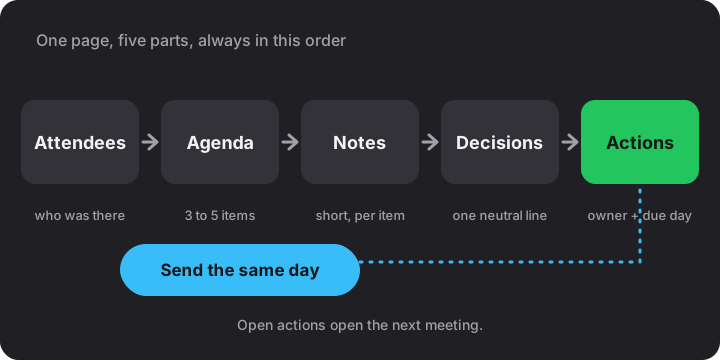
Ten minutes after a meeting ends, everyone remembers a slightly different version of what was agreed. A meeting notes template fixes that by putting five things on the page in the same order every time: attendees, agenda, notes per item, decisions and action items. Below is a copy-ready version, the rules that make it work, and variants for a 1:1, a stand-up and a client call.
The template to copy
Open a new note in Notes Online, paste this, and replace the square-bracket placeholders. I pin it so it stays at the top of the list, and before every meeting I copy its text into a new note.
Date: [date] | Attendees: [names] | Notes: [name]
## Agenda
1. [Topic one]
2. [Topic two]
3. [Topic three]
## Notes
**1. [Topic one]**
- [key point]
- [key point]
## Decisions
- [one line per decision]
## Action items
- [ ] [action] - [owner] - [due day]
- Before: fill in the title, date and agenda. Three to five items fit a half-hour meeting; more means the meeting has two purposes.
- During: type under the agenda item being discussed. Write what matters later, not what was said.
- At the end: read the decisions and action items back aloud. This takes a minute and catches most misunderstandings.
- After: copy as plain text, print or download, and send it the same day.
The order is deliberate. The agenda is what you planned, the notes are what happened, and the decisions and actions are what people need to keep. A reader with thirty seconds goes straight to the last two sections, so they sit together at the bottom, easy to find and easy to copy into an email.
Action items: one owner, one due day
My rule is blunt: an action item without a single name and a single day is a wish. Because the template writes actions as task lines, they become tick boxes in Checklist view. The progress counter then tells you at a glance how much of the last meeting is still open.
| Vague | Problem | Better |
|---|---|---|
| Look into the budget | No outcome, no owner, no day | - [ ] Send revised budget - Maria - Friday |
| Team to review the draft | "Team" owns nothing | - [ ] Comment on the draft - Omar - Wednesday noon |
| Maria and Omar to book a room | Two owners, so each assumes the other | - [ ] Book the room - Omar - Tuesday |
| Follow up ASAP | "ASAP" is a different day for everyone | - [ ] Call the supplier - Lena - Thursday |
Start each action with a verb and name the result, not the effort. "Send revised budget" can be ticked off; "work on budget" can never be finished. If two people share a job, split it into two lines, or name the one who has to make sure it happens.
Worked example: a sync produces four actions, and by the next meeting one is ticked. The note shows 1 of 4 done, which is 25 %. That is the real agenda for the follow-up: three open lines, and the first minutes go to them before any new topic.
Decisions: one neutral line each
Keep decisions in their own section, apart from the discussion. Write the outcome, not the argument: "Launch moves to next Thursday." If the reason will be asked about later, add it in a few words: "Launch moves to next Thursday because testing is not finished." Leave out who said what. Notes that record who argued for which side start arguments of their own.
A decision often creates actions. Write the decision first, then the actions that carry it out, each with its own owner and day. When nothing was decided on an agenda item, say so: "No decision; Lena to bring options on Tuesday." An honest blank is more useful than a vague summary.
Taking notes while people talk
- Type in agenda order. If the talk jumps ahead, scroll up and write it under the right heading. Order is what makes the notes readable afterwards.
- Write short. Numbers, names, dates and reasons. Skip greetings and tangents.
- Ask for the owner and the day out loud. "Who takes that, and by when?" is the most useful sentence in any meeting.
- Mark open questions with a question mark at the start of the line so you can find them before you send the notes.
After the meeting
Send the notes the same day, while people still remember the room. I paste the plain text into the email body rather than attaching a file, since people read what is in front of them. Use print or Save as PDF when someone wants paper, or download the note as .md to keep it with the project files.
To start the follow-up, copy the note's text into a new note, press “Clear done” in Checklist view to drop the ticked actions (a message offers Undo for a few seconds), keep the unticked ones and add the new agenda. Nothing falls out between meetings.
One honest caveat: notes in the browser stay on this device, in this browser. If the notes matter to the team, send them out and keep a backup file; where online notes are saved shows how. Keep passwords and private HR details out of a browser notepad altogether.
Variants for other meetings
| Meeting | Keep | Drop |
|---|---|---|
| 1:1 | Their topics first, then yours; feedback in a line; actions for both sides; a "next time" list | Attendee line; formal decisions |
| Stand-up | Three short lines per person: done, next, blocked; one action per blocker | Agenda; per-item notes |
| Client call | Company names in the attendee line; the client's requirements in their words; commitments from both sides; a confirmation line | Internal opinions that you would not want forwarded |
For a client call, end the notes with one line that restates what you promised and by when, then send it as the written confirmation. The same plain-text layout works in all three cases, and the checklist habit is what holds them together. If you want the Markdown behind the layout, the Markdown cheat sheet covers it in one page.
Frequently asked
What should meeting notes include?
Attendees, the agenda, short notes per item, the decisions made and the action items. Each action needs one owner and one due day, or nobody can be held to it.
How long should meeting notes be?
One screen for a half-hour meeting is plenty. Record outcomes, numbers and reasons, not the conversation.
Who should take the notes?
Someone who is not leading the meeting, so the chair can steer. Rotate the job if the group meets often.
When should I send meeting notes?
The same day. The decisions and actions are still fresh, and people can correct a misunderstanding before it costs anything.
Can I turn action items into a checklist?
Yes. Write each as - [ ] action - owner - due day. In Checklist view the lines become tick boxes with a count of how many are done.